Implementing Microsoft Sentinel is more than connecting log sources and enabling security rules. An effective enterprise deployment requires a clear security strategy, suitable workspace architecture, prioritized data collection, tested detection logic, defined response procedures, and continuous improvement.
This roadmap explains how organizations can plan, deploy, and optimize Microsoft Sentinel while avoiding common implementation problems.
What Is Microsoft Sentinel?
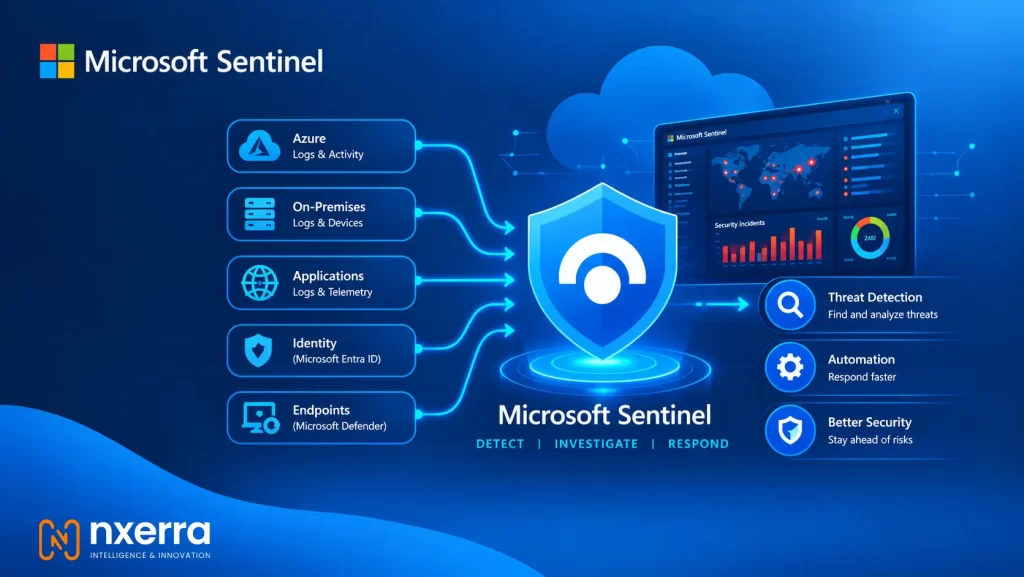
Microsoft Sentinel is a cloud-native security information and event management (SIEM) and security orchestration, automation, and response (SOAR) platform.
It helps security teams:
- Collect security data from Microsoft, Azure, on-premises, and third-party systems.
- Detect suspicious activity using analytics and threat intelligence.
- Investigate incidents through alerts, entities, timelines, and queries.
- Automate repetitive response actions.
- Hunt for threats that may not generate an alert.
- Monitor security operations through workbooks and dashboards.
Microsoft Sentinel integrates with Microsoft Defender XDR, Microsoft Entra ID, Defender for Endpoint, Defender for Identity, Defender for Cloud, Azure resources, and many external security products.
Microsoft is also moving Sentinel toward the Microsoft Defender portal. After March 31, 2027, Sentinel will no longer be supported in the Azure portal and will be available only through the Defender portal. Organizations should include this transition in their implementation planning.
Why Enterprise Planning Matters
A small proof of concept can be deployed quickly, but enterprise environments usually include:
- Multiple Azure subscriptions.
- Hybrid infrastructure.
- Several business units or regions.
- Legacy applications.
- Different identity systems.
- Compliance and data-residency requirements.
- Multiple SOC teams.
- Existing SIEM, SOAR, or ticketing platforms.
These factors influence workspace design, data retention, permissions, automation, incident ownership, and cost.
Microsoft’s deployment guidance broadly divides implementation into planning, deployment, and fine-tuning phases. The following steps turn that guidance into a practical enterprise roadmap.
Step 1: Define Security Objectives
Before creating a workspace, determine what Microsoft Sentinel must achieve.
Ask:
- Which threats create the greatest business risk?
- Which systems and identities require the most protection?
- Which compliance requirements must be supported?
- Which incidents currently take too long to investigate?
- Which manual response activities could be automated?
- What security data is already available?
- Where are the current visibility gaps?
Prioritize use cases
A useful security use case should identify the business risk, required data, detection method, response process, and expected outcome.
| Use case | Required data | Possible response |
|---|---|---|
| Compromised administrator account | Entra ID sign-in and audit logs | Disable account and escalate |
| Endpoint compromise | Defender for Endpoint data | Isolate the device |
| Unauthorized cloud change | Azure Activity Logs | Review and reverse the change |
| Data exfiltration | Firewall, proxy, endpoint, and cloud logs | Block destination and investigate |
| Ransomware activity | Endpoint, identity, file, and network data | Contain affected systems |
Begin with a manageable set of high-value use cases. Connecting every possible log source before defining business needs can increase costs and create unnecessary alert volume.
Step 2: Design the Workspace Architecture
Microsoft Sentinel requires a Log Analytics workspace. Workspace design affects data access, retention, cost, geographic placement, and administration.
Single or multiple workspaces?
A single workspace may work well when the organization has centralized security operations, similar retention requirements, and no significant regional restrictions.
Multiple workspaces may be appropriate when the organization needs:
- Regional data separation.
- Different retention policies.
- Separate business-unit administration.
- Multiple Microsoft Entra tenants.
- Strong separation between subsidiaries.
- Distinct compliance boundaries.
- Support for mergers or acquisitions.
There is no universal architecture. The decision should be based on security operations, compliance, access control, and long-term growth.
Questions to document
Before deployment, decide:
- Which Azure region will host the workspace?
- Does the region satisfy data-residency requirements?
- Will one SOC monitor the entire environment?
- Do regional teams require restricted access?
- Which logs require long-term retention?
- Will cross-workspace hunting be necessary?
- How will new subscriptions and acquisitions be added?
- Which teams can investigate sensitive incidents?
A poorly planned workspace structure can create migration and access problems later.
Step 3: Create a Data Source Strategy
More data does not always produce better security. The goal is to collect information that supports defined detection and investigation requirements.
Common starting points include:
- Microsoft Entra ID sign-in and audit logs.
- Microsoft Defender XDR.
- Microsoft Defender for Endpoint.
- Microsoft Defender for Identity.
- Microsoft Defender for Cloud.
- Azure Activity Logs.
- Critical Azure resource logs.
- Windows security events.
- Linux Syslog.
- Firewalls and VPN systems.
- DNS and proxy infrastructure.
- Important business applications.
- Third-party cloud platforms.
- Threat-intelligence sources.
Microsoft recommends prioritizing data connectors according to security value, use cases, volume, and budget.
Build a data-source matrix
| Data source | Use case | Volume | Owner | Priority |
|---|---|---|---|---|
| Entra ID | Account compromise | Medium | Identity team | High |
| Defender for Endpoint | Malware and endpoint threats | High | Endpoint team | High |
| Azure Activity Logs | Unauthorized cloud changes | Medium | Cloud team | High |
| Firewall logs | Network threats | High | Network team | High |
| Business application logs | Application abuse | Variable | Application owner | Medium |
This matrix helps determine what should be onboarded immediately and what can be added later.
Control unnecessary ingestion
Some systems produce large amounts of low-value information. Filtering irrelevant events can reduce cost and make investigations easier. However, removing the wrong events may affect detection rules, entity behavior analytics, threat hunting, and incident investigations.
Before applying a filter, document:
- What will be excluded.
- Why it is unnecessary.
- Which detections depend on the data.
- Who approved the change.
- How the filter will be tested.
- How it can be reversed.
Step 4: Plan Identity and Access
Microsoft Sentinel contains sensitive security information, so access should be based on job responsibilities.
Typical roles include:
- SOC viewer.
- Tier-one analyst.
- Tier-two investigator.
- Threat hunter.
- Detection engineer.
- Automation engineer.
- Workspace administrator.
- Security architect.
- Incident manager.
- Compliance reviewer.
Use role-based access control and avoid giving every analyst administrative access.
Privileged users should also be protected with:
- Multifactor authentication.
- Privileged Identity Management.
- Just-in-time role activation.
- Approval-based elevation.
- Regular access reviews.
- Separate administrative accounts.
- Detailed audit logging.
Define who can modify connectors, analytics rules, playbooks, retention settings, and incident status.
Step 5: Estimate Costs
A Sentinel budget should include more than the platform itself. Consider:
- Data ingestion.
- Log Analytics costs.
- Retention.
- Data export or replication.
- Logic Apps used by playbooks.
- Azure Monitor Agent deployment.
- Storage requirements.
- Custom connectors.
- Network components.
- Third-party licenses.
- SOC staffing.
Estimate daily volume for each data source and project growth over the next 12 to 24 months. Also identify which logs require long-term retention and which can use shorter retention.
Do not reduce costs by removing security data without assessing the impact on detection coverage. The goal is cost-effective visibility, not minimal ingestion.
Step 6: Deploy a Controlled Pilot
After planning, deploy a limited pilot that represents real operating conditions.
A pilot might include:
- One or two critical Azure subscriptions.
- Identity logs.
- Endpoint telemetry.
- One network or firewall source.
- Several high-priority detections.
- A defined SOC team.
- One or two tested playbooks.
The pilot should answer:
- Are logs arriving correctly?
- Are timestamps and entities accurate?
- Are analytics rules producing useful incidents?
- Can analysts investigate incidents efficiently?
- Is the false-positive rate manageable?
- Are automated actions safe?
- Does the actual cost match the estimate?
A connector showing “connected” does not mean the deployment is operationally successful.
Step 7: Configure Detection Content
Microsoft Sentinel includes analytics rules, workbooks, watchlists, playbooks, automation rules, and solutions from the Content Hub.
Start with built-in content and adapt it to your environment. Then create custom KQL detections for organization-specific risks.
Every production rule should include:
- A clear name.
- A defined security purpose.
- Required data sources.
- Severity and ownership.
- A false-positive procedure.
- Response guidance.
- A review date.
- A test case.
- MITRE ATT&CK mapping where appropriate.
Avoid enabling every available rule without testing. Poorly tuned rules can create alert fatigue and reduce analyst confidence.
Track:
- Alert and incident volume.
- False-positive rate.
- Mean time to acknowledge.
- Mean time to investigate.
- Repeated incidents.
- Rules that never trigger.
- Rules that generate excessive noise.
- Detection coverage across important attack techniques.
Step 8: Create Incident Response Workflows
Technology cannot replace a clear response process. Define:
- Incident severity levels.
- Ownership and escalation.
- Communication channels.
- Evidence-handling requirements.
- Containment authority.
- Compliance notification procedures.
- Closure requirements.
- Post-incident review steps.
Microsoft recommends reviewing incidents, examining related alerts and entities, using incident context, and hunting for additional suspicious activity during investigations.
Create analyst runbooks that explain:
- What triggered the incident.
- Which users, devices, and resources should be reviewed.
- Which queries should be run.
- What evidence should be preserved.
- Which teams should be contacted.
- What containment actions are permitted.
- When the incident can be closed.
- What details must be documented.
Consistent runbooks help analysts respond faster and improve the quality of incident records.
Step 9: Automate Carefully
Playbooks can connect Sentinel with ticketing systems, messaging platforms, identity services, endpoint tools, and threat-intelligence sources.
Good early automation examples include:
- Creating service desk tickets.
- Sending notifications.
- Enriching IP addresses and domains.
- Adding incident tags.
- Assigning incidents.
- Collecting additional context.
Use approval gates for disruptive actions such as:
- Disabling accounts.
- Isolating servers.
- Blocking large network ranges.
- Deleting files.
- Revoking privileged access.
Every playbook should have an owner, documented permissions, error handling, logging, test cases, and a rollback process.
Step 10: Add Threat Hunting and UEBA
Detection rules identify known patterns, but threat hunting helps analysts search for suspicious behavior that has not generated an alert.
A simple hunting cycle is:
- Create a threat hypothesis.
- Identify the required data.
- Write and test KQL queries.
- Review related users, devices, IPs, and resources.
- Confirm or reject the hypothesis.
- Create a detection if the behavior is validated.
- Record the findings.
Useful hunting hypotheses include:
- A privileged account is signing in from an unusual location.
- A new application has excessive permissions.
- A host is contacting rare external destinations.
- A service principal is performing unexpected administrative actions.
- A user is accessing sensitive data outside normal patterns.
UEBA can support behavioral analysis, but it should complement reliable logging and well-designed detection content.
Step 11: Test Before Production
Testing should cover technical, detection, and operational requirements.
Confirm that:
- Logs arrive within the expected time.
- Required fields are present.
- Connectors remain healthy.
- Analytics rules trigger correctly.
- Incidents contain useful entities.
- Workbooks display accurate information.
- Playbooks execute as expected.
- Permissions work correctly.
- Retention settings match the design.
- Costs remain within the approved estimate.
Use approved simulations or controlled scenarios to test account compromise, malware, suspicious sign-ins, privilege escalation, cloud changes, and network threats.
Ask SOC analysts to investigate a realistic incident from start to finish, including triage, escalation, containment, documentation, and closure.
Step 12: Operate and Improve Continuously
Microsoft Sentinel is not a set-and-forget platform. Microsoft recommends regularly reviewing incidents, analytics rules, automation rules, playbooks, watchlists, ingestion costs, data collection, and MITRE ATT&CK coverage.
Daily
- Review high-severity incidents.
- Check connector health.
- Monitor failed playbooks.
- Triage new incidents.
- Escalate urgent investigations.
Weekly
- Analyze false positives.
- Review detection performance.
- Check unusual ingestion changes.
- Update watchlists.
- Test selected playbooks.
Monthly
- Review costs and data volume.
- Retire unused rules.
- Improve noisy detections.
- Review permissions.
- Conduct threat-hunting exercises.
- Update runbooks and documentation.
- Measure response performance.
Important KPIs include mean time to detect, mean time to acknowledge, mean time to contain, false-positive rate, playbook success rate, connector availability, ingestion cost, and detection coverage.
Common Implementation Mistakes
Connecting every source immediately
This can increase costs and overwhelm analysts. Start with data linked to high-priority use cases.
Treating default rules as a finished SOC
Built-in detections are a foundation, not a complete security program. Customize them for your environment.
Ignoring data quality
Missing fields, duplicate events, inaccurate timestamps, and inconsistent hostnames can make investigations unreliable.
Automating containment too soon
High-impact actions should be tested carefully and should usually include analyst approval during the early stages.
Failing to assign ownership
Every important connector, rule, workbook, watchlist, and playbook needs an accountable owner.
Delaying the Defender portal transition
Organizations currently using Sentinel through the Azure portal should plan their move to the Microsoft Defender portal before March 31, 2027.
Final Checklist
Before declaring the implementation complete, confirm that:
- Security objectives are documented.
- Priority use cases are approved.
- Workspace architecture is defined.
- Data sources are prioritized.
- Costs are estimated.
- RBAC roles are assigned.
- Connectors are healthy.
- Detection rules are tested.
- SOC runbooks are available.
- Playbooks have owners.
- High-impact automation requires approval.
- Threat hunting is included.
- MITRE coverage is reviewed.
- Ingestion costs are monitored.
- The Defender portal transition is planned.
Conclusion
A successful Microsoft Sentinel implementation is not measured by the number of connected data sources. It is measured by whether the organization can detect meaningful threats, investigate them efficiently, respond safely, and improve over time.
The most effective approach is incremental:
- Define business-driven security use cases.
- Design the workspace architecture.
- Prioritize valuable data.
- Establish access and cost controls.
- Run a controlled pilot.microsoft-sentinel-implementation-a-step-by-step-enterprise-roadmap
- Tune detection content.
- Build repeatable response processes.
- Automate low-risk activities first.
- Expand coverage gradually.
- Review performance continuously.
For organizations without sufficient internal resources, a Microsoft Sentinel implementation partner can support architecture design, connector onboarding, KQL detection engineering, playbook development, incident workflows, cost optimization, and ongoing security operations.