A company can launch an AI chatbot in a matter of weeks. Building an AI system that can safely participate in business operations is a different challenge.
That distinction is becoming increasingly important as enterprises move from experimenting with generative AI to connecting it with customer platforms, data systems, productivity tools, security environments, and internal workflows.
Many technology discussions use “chatbot” and “AI agent” as if they mean the same thing. They do not.
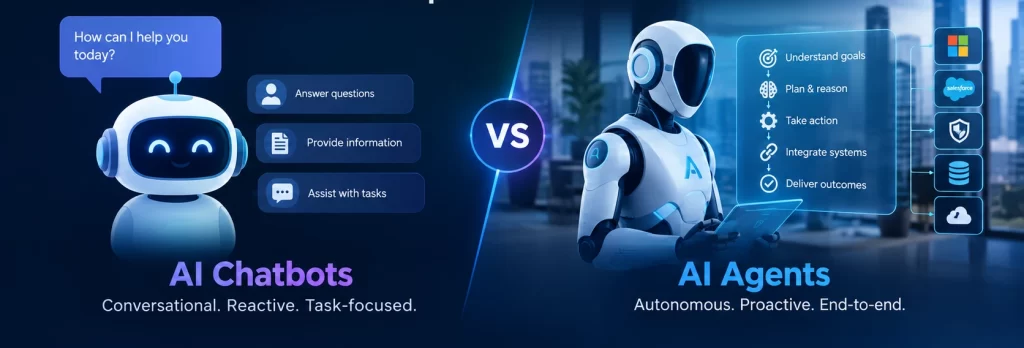
A chatbot is generally built to communicate with a user. It can answer questions, retrieve information, guide someone through a process, and escalate a request when necessary.
An AI agent can take on a broader responsibility. It may interpret an objective, gather information, use approved tools, follow business rules, complete several steps, and return the result. Some agents can also operate from an event or schedule rather than waiting for a person to start a conversation.
The interface may look similar. The enterprise implications are not.
The key difference: responsibility
A practical way to distinguish an AI chatbot from an AI agent is to examine what happens after the system responds.
A chatbot generally provides an answer:
- It explains a company policy.
- It finds information in an approved knowledge source.
- It gives a customer an order update.
- It recommends a next step.
- It collects basic details before handing a case to a human.
An AI agent is designed to continue the process:
- It retrieves information from more than one system.
- It evaluates conditions against business rules.
- It calls a workflow or API.
- It creates or updates a record.
- It requests approval when required.
- It confirms whether an action succeeded.
- It escalates an exception to the correct person.
Consider an internal procurement request.
A chatbot could tell an employee how to buy a laptop and provide a link to the purchasing policy. An agent could check the employee’s department, review the approved equipment list, verify the available budget, create a purchase request, and send it to the appropriate approver.
The second solution may save more time, but it also carries more responsibility. If the agent has incorrect permissions or applies the wrong rule, it could create financial, operational, or compliance problems.
This is why the difference between the two technologies should be measured by authority, not by how natural the conversation feels.
What an enterprise chatbot does
An enterprise chatbot is a conversational layer that helps users interact with information or services.
Earlier business chatbots relied heavily on decision trees and fixed responses. Modern systems can understand broader language, summarise content, retrieve relevant documents, and respond to questions that were not written in an exact predefined format.
Typical business chatbot applications include:
Employee support
An employee can ask about leave, expenses, workplace policies, benefits, or equipment procedures without searching through multiple portals.
Customer service
A chatbot can answer common questions about products, delivery, account access, returns, or service availability. More complicated requests can be transferred to a support professional with the conversation history attached.
IT assistance
A chatbot can explain how to connect to a corporate network, request software, configure a device, or report a technical issue.
Knowledge discovery
Employees can use a chatbot to search internal documents, operating procedures, project material, and training content through natural-language questions.
These use cases are valuable when the main difficulty is finding and understanding information.
A chatbot becomes particularly useful when the organisation has a large amount of documentation but employees struggle to locate the right version. The quality of the result depends on the quality, permissions, ownership, and maintenance of those sources.
A chatbot should not be treated as a replacement for good information management. If an organisation has conflicting policies or outdated documents, an AI interface can make those problems easier to access—not eliminate them.
What an AI agent adds
An AI agent connects conversation or intent with execution.
Microsoft describes agents as systems that can use connected knowledge and tools to reason through a request and complete tasks. Copilot Studio supports agents that can use flows, prompts, APIs, and other tools connected to business systems.
An agent may perform several different activities:
- Understand what the user is trying to accomplish.
- Identify the information needed.
- Retrieve context from approved sources.
- Decide which tool or workflow is appropriate.
- Complete an action.
- Check the result.
- Return a clear explanation or request human assistance.
For example, an accounts payable agent might receive an invoice and:
- Read the document.
- Identify the supplier and invoice number.
- Compare the invoice with a purchase order.
- Check for duplicate submissions.
- Highlight a mismatch.
- Route the invoice for approval.
- Record the outcome in the finance system.
The agent is not simply generating text. It is participating in a controlled business process.
That difference makes agents attractive to enterprises with large volumes of repetitive work. It also means the organisation must define what the agent is allowed to do, what it must never do, and when a human must make the decision.
Comparison for enterprise buyers
| Area | AI chatbot | AI agent |
|---|---|---|
| Main role | Communicate information | Complete or coordinate work |
| Typical starting point | A question or conversation | A goal, request, event, or workflow |
| Data access | Often focused on selected knowledge sources | May combine multiple data sources and systems |
| Business actions | Usually limited | Can call tools, APIs, and workflows |
| Autonomy | Low to moderate | Moderate to high, depending on design |
| Best suited for | FAQs, knowledge search, guided support | Repetitive multi-step processes |
| Main risk | Incorrect or incomplete information | Incorrect actions or unauthorised changes |
| Governance needs | Content quality, privacy, access, escalation | All chatbot controls plus permissions, approvals, monitoring, and action controls |
| Human involvement | Escalation for difficult questions | Approval, exception handling, and oversight for sensitive actions |
The table does not mean every chatbot is simple or every agent is autonomous. There is a wide range of designs between the two.
A chatbot can be connected to a ticketing system. An agent can be configured to require approval before taking action. The labels are less important than the actual capabilities.
When evaluating a proposed solution, ask:
- What information can it access?
- What tools can it use?
- Can it alter a system of record?
- Can it act without a user request?
- Does it need approval?
- Can the organisation reconstruct its decisions and actions?
The answers reveal the real risk and implementation requirements.
When an enterprise should choose a chatbot
A chatbot is often the better option when the business wants to improve access to information without introducing extensive workflow automation.
It may be appropriate when:
- Users mainly need answers.
- The knowledge domain is clearly defined.
- Existing processes already work but are difficult to navigate.
- The business wants to reduce repetitive support questions.
- The chatbot can escalate uncertain or sensitive requests.
- The organisation is beginning its AI programme and wants a contained pilot.
- There is no clear business case for granting access to transactional systems.
A chatbot can also be used as the first stage of a larger programme.
For example, an IT team might begin with an assistant that explains software access procedures. After observing real user requests, the team may discover that a large percentage of interactions follow a repeatable pattern. That specific process could later be converted into a governed agent workflow.
Starting with information access gives the organisation an opportunity to improve content, permissions, user training, and measurement before adding system actions.
When an AI agent is justified
An AI agent is worth considering when employees are spending considerable time coordinating predictable tasks across different systems.
Strong candidates usually have several characteristics:
- The process occurs frequently.
- The steps are reasonably consistent.
- The required information is available digitally.
- The outcome can be measured.
- Business rules can be documented.
- Exceptions can be identified.
- Human approval can be inserted where necessary.
- The cost of manual processing is meaningful.
Good examples might include:
- Classifying and routing service requests.
- Preparing customer account summaries.
- Reviewing documents for defined fields.
- Checking data quality across business records.
- Coordinating employee onboarding tasks.
- Enriching security alerts with additional context.
- Creating first drafts of operational reports.
- Preparing finance or procurement requests for review.
The strongest early use cases are usually not the most ambitious ones. They are the processes where the organisation already understands the workflow and can define success clearly.
An enterprise should be cautious about assigning an agent responsibility for high-impact decisions without strong controls. Hiring, credit approval, access revocation, legal conclusions, safety decisions, and financial transactions may require specialist review, documented controls, and regulatory consideration.
The hidden work behind an AI agent
The visible part of an agent is often a prompt and a chat window. The difficult part is everything behind it.
Data quality
An agent can only provide dependable results when it can access relevant, current, and authorised information. Enterprises should identify the source of truth for each important data element and remove conflicting versions wherever possible.
Access control
The agent should not become an indirect route around a user’s existing permissions. A user who cannot access a sensitive record directly should not be able to obtain it merely by asking an AI assistant.
Tool permissions
Each connected tool should have a defined purpose. An agent that only needs to read a customer record should not automatically receive permission to delete, approve, or modify records.
Workflow boundaries
The system should distinguish between reversible and irreversible actions. Creating a draft may be automated. Sending a legal notice, issuing a refund, changing a security policy, or approving a payment may need human confirmation.
Monitoring
Enterprises should be able to see what the agent received, what information it retrieved, which tools it called, what action it attempted, and whether the action completed successfully.
Exception handling
An agent should have a clear response when information is missing, systems disagree, a workflow fails, or a request falls outside policy. “Try again later” is not an operating model.
Ownership
Every production agent needs a business owner and a technical owner. Someone must be responsible for its instructions, data sources, permissions, performance, changes, and retirement.
NIST’s AI Risk Management Framework is designed to help organisations incorporate trustworthiness considerations into the design, development, use, and evaluation of AI systems. For agent-based systems, that thinking should extend to tool access, workflow actions, human oversight, and operational monitoring.
A safer enterprise adoption path
A sensible adoption programme does not begin by giving an AI system access to every application.
It usually progresses through controlled stages.
Stage one: information
Start with a narrow knowledge assistant. Limit the content sources, define the audience, and measure answer quality, usefulness, and escalation rates.
Stage two: recommendations
Allow the system to summarise information, identify possible next steps, or prepare drafts. Keep final decisions with employees.
Stage three: controlled actions
Connect the assistant to a small number of approved workflows. Require confirmation or approval for actions that change records or create external commitments.
Stage four: bounded autonomy
Allow the agent to complete low-risk, repeatable tasks automatically. Monitor outcomes and retain the ability to pause, review, or disable the process.
This progression helps the enterprise learn where AI is reliable and where it needs additional controls.
Microsoft’s Copilot Studio documentation supports combining agents with workflows, tools, and human-in-the-loop actions. Workflows can include AI-driven steps, business logic, and approval activities rather than leaving every decision to an open-ended model.
That combination is important. The best enterprise architecture is rarely “AI everywhere.” It is usually a blend of AI reasoning, deterministic workflow logic, system permissions, and human judgement.
Questions leaders should ask
Before approving an AI chatbot or agent project, business and technology leaders should ask:
- What measurable problem are we solving?
- Is the required capability informational or operational?
- Which people will use the system?
- What data will it access?
- Who owns that data?
- What can the system change?
- Which actions require approval?
- How will mistakes be detected?
- How will users challenge or correct an answer?
- What records will be retained for audit?
- What happens when the connected application is unavailable?
- Who reviews the system after a policy, process, or application changes?
- How will success be measured after launch?
These questions move the discussion away from product demonstrations and toward enterprise readiness.
A convincing demonstration may show an agent completing a smooth scenario. Production operation must also account for incomplete requests, conflicting records, unusual cases, malicious input, failed integrations, permission changes, and user misunderstanding.
How Nxerra can help
Enterprises need more than an AI interface. They need a practical path from business problem to secure implementation.
Nxerra helps organisations assess where AI can create measurable value, select an appropriatarchitecture, connect AI capabilities with enterprise systems, and establish the controls required for reliable operation.
The right implementation may be a chatbot, an agent, a workflow, or a combination of all three. The decision should be based on the work the organisation wants to improve—not on which technology is receiving the most attention.
Final perspective
The difference between an AI chatbot and an AI agent is not simply that one is basic and the other is advanced.
A chatbot primarily helps users interact with information.
An AI agent can help an organisation move work through a process.
That additional capability can create significant value, especially when teams deal with repetitive coordination, disconnected systems, and high volumes of structured requests. But it also introduces greater responsibility. Once AI can retrieve sensitive data, call business tools, or change records, the organisation must treat it as part of the operating environment.
For most enterprises, the best approach is to begin with a clear business problem, use the lowest level of autonomy that can deliver value, and increase capability only when the data, security, workflow, and governance foundations are ready.
The goal is not to make every interaction autonomous.
The goal is to make important work more efficient without sacrificing control, accountability, or trust.